Clamp pressure is a narrow desk question, not a generic tidy-up task. A practical method for matching pads, screw contact, and desk material without over-tightening a holder. The useful evidence comes from the actual materials, movements, and equipment at the intended location, because a holder that looks plausible in a product image may meet a completely different desk interface in use.
This pressure check is deliberately slow. It focuses on contact surfaces, clamp alignment, ordinary headset pickup, and a later visual review. That sequence keeps a reader from interpreting resistance at the knob as proof that the installation is correct. The useful evidence is level, even contact under the maker’s guidance, plus a setup that remains understandable when the headset, cable, and nearby furniture are used normally.
Begin with clean contact surfaces
Clamp pads work best when dust, grit, and loose cable fragments are not trapped between the pad and the desk. A clean wipe with a dry, soft cloth makes the contact easier to inspect and avoids mistaking debris for a poor fit. It is a small step that makes later observations more reliable.
Look at both pad faces before installation. A pad that is missing, curled, cracked, or visibly uneven should be addressed through the product support path instead of being compensated for with extra tightening. The goal is an even contact surface, not a heroic grip.
Dust or uneven pad material can make a sound clamp interface look unreliable for the wrong reason. For this guide, begin with clean contact surfaces is the immediate checkpoint; record the observed condition and its next question before moving to another desk decision.
Seat the top pad before turning the screw
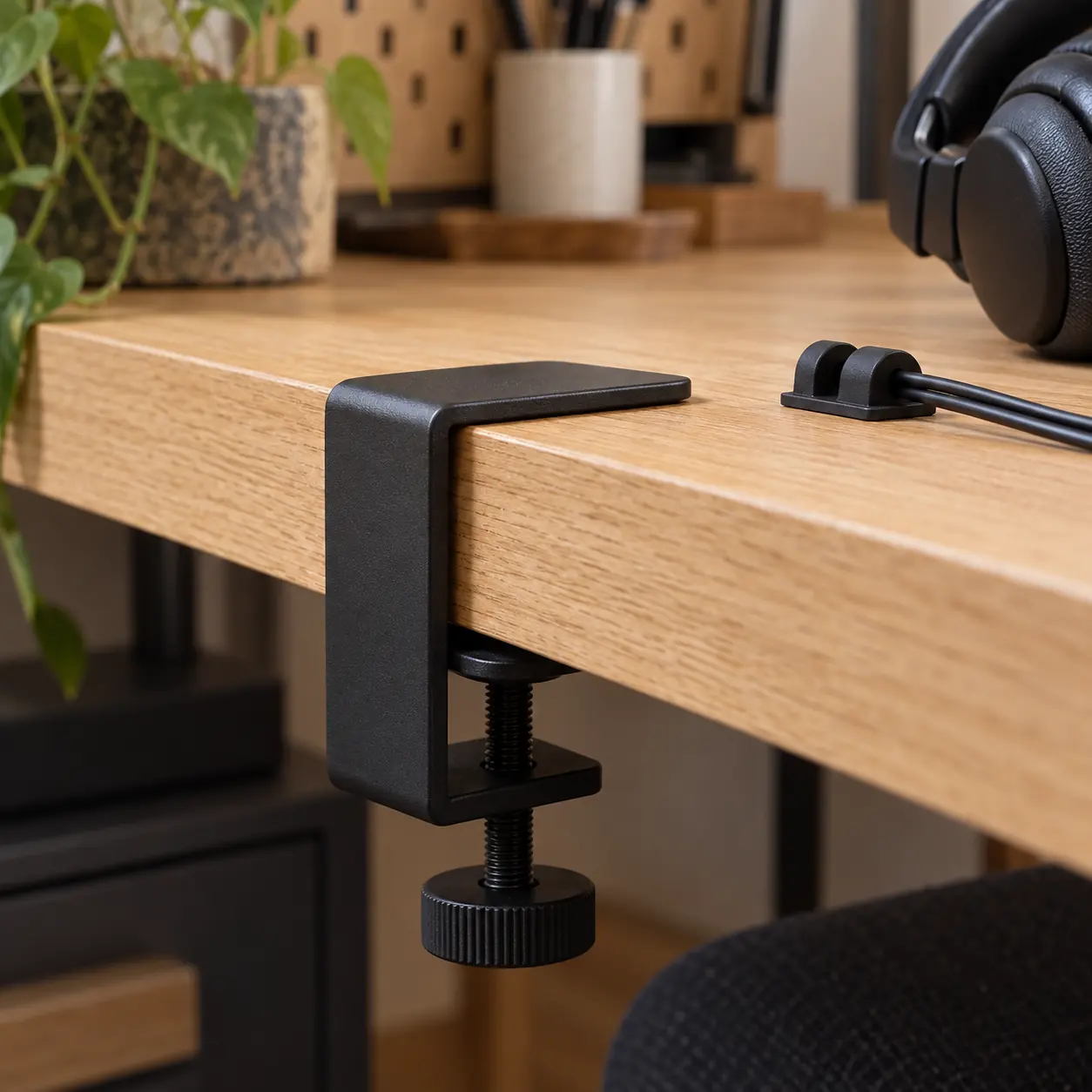
Position the upper pad squarely on the chosen desk area and hold the clamp body level while the lower pad approaches. If the body is already leaning because it meets a bevel, rail, or drawer hardware, pause before applying pressure. A skewed start can concentrate force on an edge.
Tighten in small turns, stopping to check whether both pads stay aligned. The most useful signal is stable, flat contact rather than a dramatic change in resistance. A clamp that needs to be wrestled into position is giving installation information, not asking for more torque.
A level body and parallel pads are more informative than an impressive amount of turning resistance. For this guide, seat the top pad before turning the screw is the immediate checkpoint; record the observed condition and its next question before moving to another desk decision.
Use stability checks that resemble use
After a modest tightening, hang no more than the intended headset and lightly touch the hook from its normal approach direction. Watch for a shift in the clamp body, a pad that walks toward an edge, or a screw that contacts an obstruction. These observations are more relevant than trying to pull the holder loose.
Repeat the check after opening a nearby drawer or moving the chair, because an otherwise stable holder can meet a new path during normal work. Do not swing, load, or stress-test the hanger. The question is whether it remains planted during ordinary headset storage, not what force it can survive.
Ordinary headset pickup reveals stability without changing the task into a force experiment. For this guide, use stability checks that resemble use is the immediate checkpoint; record the observed condition and its next question before moving to another desk decision.
Protect materials by respecting the interface
A desk surface can be sensitive even when it looks tough. Veneer, laminate joins, paint, and soft woods have different concerns, and a generic article cannot determine what a particular finish will tolerate. Product instructions and desk-care guidance are stronger sources than a guess based on appearance.
If the surface shows a mark, compression, or unexpected movement, stop and reassess the location. Do not add improvised shims, adhesive stacks, or padding that changes the clamp geometry unless the manufacturer explicitly supports that method. A surface concern should narrow the setup, not invite a workaround.
Surface marks or compression are a reason to pause rather than to add an improvised spacer. For this guide, protect materials by respecting the interface is the immediate checkpoint; record the observed condition and its next question before moving to another desk decision.
Recheck after the first workday
Temperature, desk movement, and ordinary use can make an early installation look different later. Revisit the contact points after a day of normal work, with the headset removed. Look for pad position, screw alignment, and any change in the desk surface.
This is an inspection, not a retightening ritual. If the clamp remains level and the pads remain flat, leave the setting alone. If it has shifted, first identify the reason—edge shape, obstruction, cable pull, or an unsuitable spot—rather than immediately turning the screw tighter.
A later check can distinguish a changed desk interface from a simple need for more tightening. For this guide, recheck after the first workday is the immediate checkpoint; record the observed condition and its next question before moving to another desk decision.
Keep the limit visible
A clamp is a storage interface, not a substitute for a structural mounting system. Follow the maker’s stated compatibility and capacity limits, and keep the holder away from areas where a dropped headset could meet a monitor, hard floor, or moving drawer.
The practical outcome is a calm setup: a square clamp, intact pads, a reasonable access path, and a note of any uncertainty. This is more useful than assuming that a tightly turned knob proves a permanent installation or that a desk material is interchangeable with every other desk.
A clamp location that needs force or awkward access has already supplied a useful limit. For this guide, keep the limit visible is the immediate checkpoint; record the observed condition and its next question before moving to another desk decision.
What this check carries forward
Pressure is easiest to judge through alignment, not through effort. A clamp that lies level, meets the desk on both pads, and stays put through a normal headset pickup is giving useful evidence. A knob that feels very tight may instead be reacting to a bevel, an obstruction, or a pad that is no longer flat. That distinction matters because force can conceal a mismatch for a while without correcting it. Product instructions should set the limit; the desk observation tells you whether the intended location is a reasonable place to follow those instructions.
Keep a small separation between installation and maintenance. Installation is the initial choice of site, pads, level contact, and cable direction. Maintenance is a later look at whether those conditions still exist. Mixing the two can create a cycle in which every small change is answered with more tightening. A better response is diagnostic: remove the headset, inspect the contact line, note any new drawer hardware or cable pull, and decide whether the location still has the same interface it had on day one.
If the holder cannot be secured without visible strain, difficult access, or an unexplained mark on the desk, that is a complete answer for that site. A different edge, a different mount type, or no accessory at all can be more appropriate than an improvised fit. The quality of a setup is not measured by whether it was forced to work; it is measured by whether the contact and daily movement remain understandable.
A restrained installation is easier to inspect later. The clamp can be seen, the pads can be checked, the screw can be reached, and the headset can be stored without asking the mechanism to compensate for a poor surface. When those conditions are absent, the installation note should preserve the limitation. A calmer desk is produced by clear contact and modest force, not by winning an argument with a tightening knob.
The pressure check should leave behind a clear observation rather than a dramatic installation story. Note whether both pads remained flat, whether the screw stayed accessible, and whether normal headset pickup moved the body. Those three observations separate a stable contact from a stubborn location. If a later inspection finds a shift, compare it with the original note before turning anything. A changed cable pull or a new drawer attachment may explain the movement more directly than clamp force. This makes the follow-up reversible: identify the changed condition, then decide whether the location still supports the maker’s specified installation method.
Use the next note, not a bigger claim
When contact remains level after ordinary pickup, the next concern is the headset’s route through the surrounding furniture. Move to the cable map or clearance note with the clamp location fixed in mind. If level contact never appears, return to the edge audit rather than adding turns or unapproved padding.
Return to the main Deskline Register field report for the complete decision sequence. Its supporting notes keep the pressure observation separate from cable slack, drawer clearance, and shared-desk habits, which makes a later adjustment easier to explain.